
Clean a CSV While Preserving Leading-zero Identifiers
Trim cells and headers, remove exact duplicate rows and inspect identifiers before importing a cleaned CSV into a spreadsheet.
Maintained by Fixora. Reviewed .
Treat identifiers as text
An account code such as 00123 is not the same representation as the number 123. Fixora reads CSV cells as strings instead of guessing numbers or dates. That protects the identifier during this tool’s processing.
CSV does not carry spreadsheet column types. Opening the exported file in another application may still remove zeros or reinterpret dates. Use that application’s import controls and explicitly select text for identifier columns.
Choose the changes you actually need
Load the file into Clean a CSV for import. Inspect the delimiter and choose whether to keep, trim or normalize headers. Enable Trim cell spaces if surrounding whitespace is unwanted, and Remove exact duplicate rows only when identical rows should be collapsed.
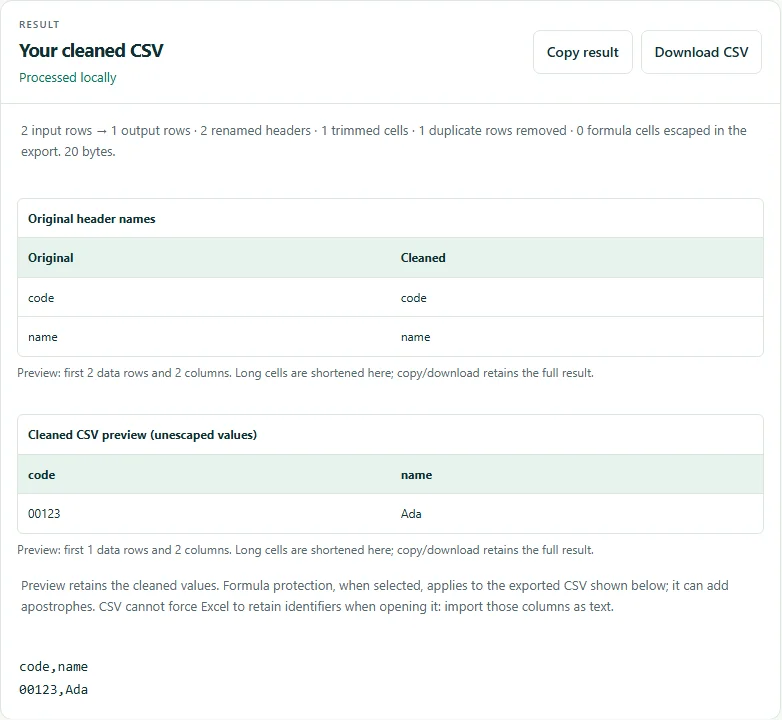
For the example below, choose Trim headers, Trim cell spaces and exact-row deduplication. The two records become identical after trimming, so one remains.
Input:
 code , name
00123, Ada
00123,Ada

Expected headers: code,name
Expected record: 00123,Ada
Expected data rows: 1
Review what was removed or renamed
Check the reported header changes, trimmed cells and duplicate-row count. Exact-row deduplication does not merge records with the same ID and different details. Decide how to resolve those records separately.
Header normalization can create duplicate names. Fixora rejects blank or duplicate resulting headers instead of silently overwriting them. If this happens, keep original headers or rename them deliberately.
Check spreadsheet interpretation and formula-like cells
If untrusted data will be opened in a spreadsheet, review the formula-protection option. It adds an apostrophe to potentially executable cells and changes their exported representation. Choose it deliberately; it is separate from preserving leading zeros.
Inspect a small import before replacing a production dataset. The cleaner accepts bounded, rectangular CSV data and does not repair every malformed export or support XLSX files. Keep the original file for comparison.
Try the verified example
These small files contain synthetic data. Download the inputs, follow the settings above, and compare your result with the expected output.
Tools for this task
Related guides
- Compare Two CSV Exports Using a Unique Key
Match CSV records by a stable identifier and distinguish added, removed and changed rows from simple row-order differences.
Suggest a correction with a nonsensitive example.