
Compare Two CSV Exports Using a Unique Key
Match CSV records by a stable identifier and distinguish added, removed and changed rows from simple row-order differences.
Maintained by Fixora. Reviewed .
Choose an identifier that stays with the record
A line-by-line text comparison can report many differences when an export is sorted differently. A key-based CSV comparison matches records by an identifier, so row movement is separate from value changes.
Choose a column such as id only when its values are unique and nonblank in both exports. Fixora requires matching column names and rectangular data. Duplicate keys are rejected; it does not guess which row should survive.
Try a small comparison
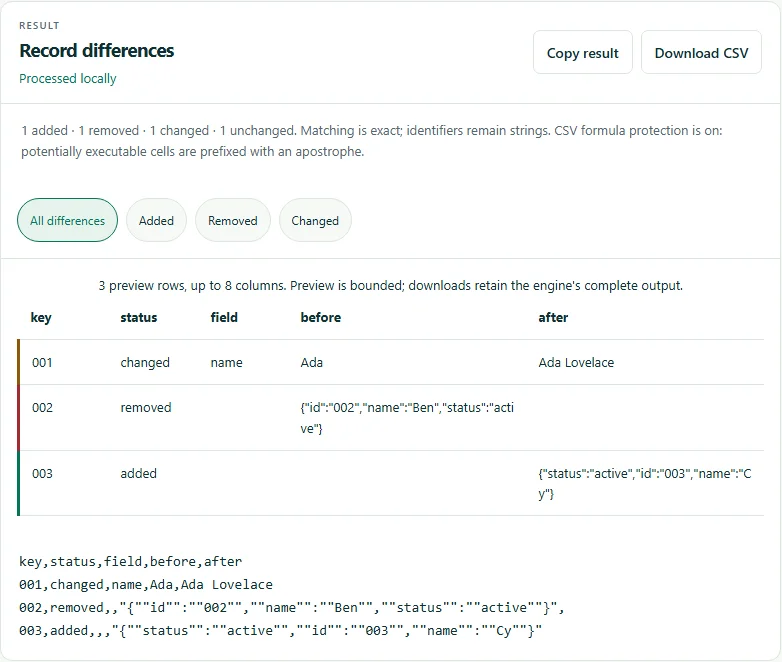
Open Compare two CSV exports, load the old and new CSVs or use Paste CSV instead, select id as the shared key and run the comparison. These synthetic exports have one changed record, one removal, one addition and one unchanged record.
The new export changes both row order and column order. Identifier 004 remains unchanged because comparison uses the shared key and matching column names, rather than positions. Download both files from the worked example below.
Old CSV:
id,name,status
001,Ada,active
002,Ben,active
004,Dee,active

New CSV:
status,id,name
active,004,Dee
active,003,Cy
active,001,Ada Lovelace

Expected: added 003; removed 002; changed 001 (name); unchanged 004.
Read the field changes
Review added, removed and changed records separately. Confirm that a removal reflects a complete export rather than a filter or missing source data. Column order may differ, but names must match.
Values remain strings. Leading-zero identifiers and numeric-looking text are not converted to numbers. Different spelling, spaces or capitalization may be meaningful differences; there is no fuzzy matching or formula evaluation.
Resolve invalid input before trusting the report
Use CSV preview to inspect delimiters and headers. Fix duplicate or blank headers, inconsistent field counts and missing keys at the source. CSV cleanup can trim cells, but normalization may change the identifiers you intended to match.
Inputs are limited to 10 MB, 50,000 rows and 200 columns per file. Report size and field-difference limits also apply. This is a bounded CSV workflow, not an XLSX comparison or a streaming database reconciliation.
Try the verified example
These small files contain synthetic data. Download the inputs, follow the settings above, and compare your result with the expected output.
Tools for this task
Related guides
- Clean a CSV While Preserving Leading-zero Identifiers
Trim cells and headers, remove exact duplicate rows and inspect identifiers before importing a cleaned CSV into a spreadsheet.
Suggest a correction with a nonsensitive example.