
Reduce an Image Toward a Form’s File-size Limit
Try a target size in KB, compare image quality and inspect the actual output before submitting a photo to a form.
Maintained by Fixora. Reviewed .
Check both the file-size and pixel rules
A form may require a particular format, maximum bytes and pixel dimensions. A smaller picture can still be rejected if it has the wrong format or width. Keep the original and write down the form’s requirements before editing.
Fixora’s image compressor accepts still JPEG, PNG and WebP files. It does not verify that a photo meets passport, identity or other official submission rules.
Try a measured size target
Choose an image in the compressor. Select Measured size target, choose a supported output format and enter the target in KB. If the form requires JPEG, choose JPEG rather than relying on the filename.
For a synthetic 2400 × 1600 photo and a form allowing a smaller image, a Maximum width of 1200 produces 1200 × 800 pixels. A target such as 200 KB asks the encoder to try a bounded quality search. It does not guarantee an output under the limit.
Reproduce a known-size export
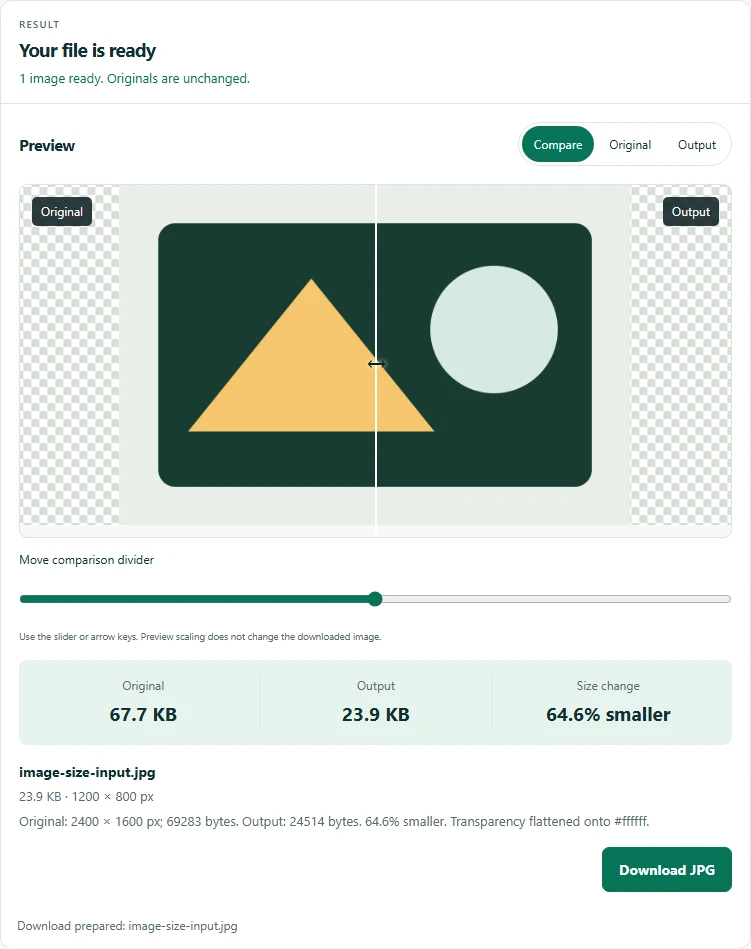
Download the synthetic JPEG below and choose it in the compressor. Select Manual quality, choose JPEG, leave Quality at its default 86 and enter Maximum width 1200. Select Compress images.
The 2400 × 1600 source should become 1200 × 800 pixels. In the checked Chromium run it exported 24,514 bytes. Compare the original and output, then download JPG and inspect its dimensions. Encoder bytes can differ by browser, and this simple illustration is not representative of photographic detail.
Compare the output before downloading
Inspect faces, small text, edges, orientation and colors in the original and exported previews. Read the reported output size and format. Compression depends on image detail and browser encoding, so there is no fixed file-size reduction for this example.
If the target is missed, consider reducing dimensions within the form’s rules, changing to JPEG or WebP when accepted, or adjusting quality. PNG has no adjustable lossy quality control here and can become larger after re-encoding.
Understand what the export changes
JPEG uses lossy compression and replaces transparency with the chosen background. Re-encoding does not retain original metadata. Increasing pixel dimensions cannot recover missing detail.
The tools process image input locally. The website still loads assets, and Cloudflare Web Analytics measures page and performance information separately from tool content. See the privacy notice for data handling. Upload only the reviewed export to the destination form, and check its acceptance message.
Try the verified example
These small files contain synthetic data. Download the inputs, follow the settings above, and compare your result with the expected output.

Tools for this task
Suggest a correction with a nonsensitive example.